SubTime - Sub Timer & Rotation
- 4.7
- Rating
- 100.00K
- Installs
- Free
- Price

 Analysis by App-foxy
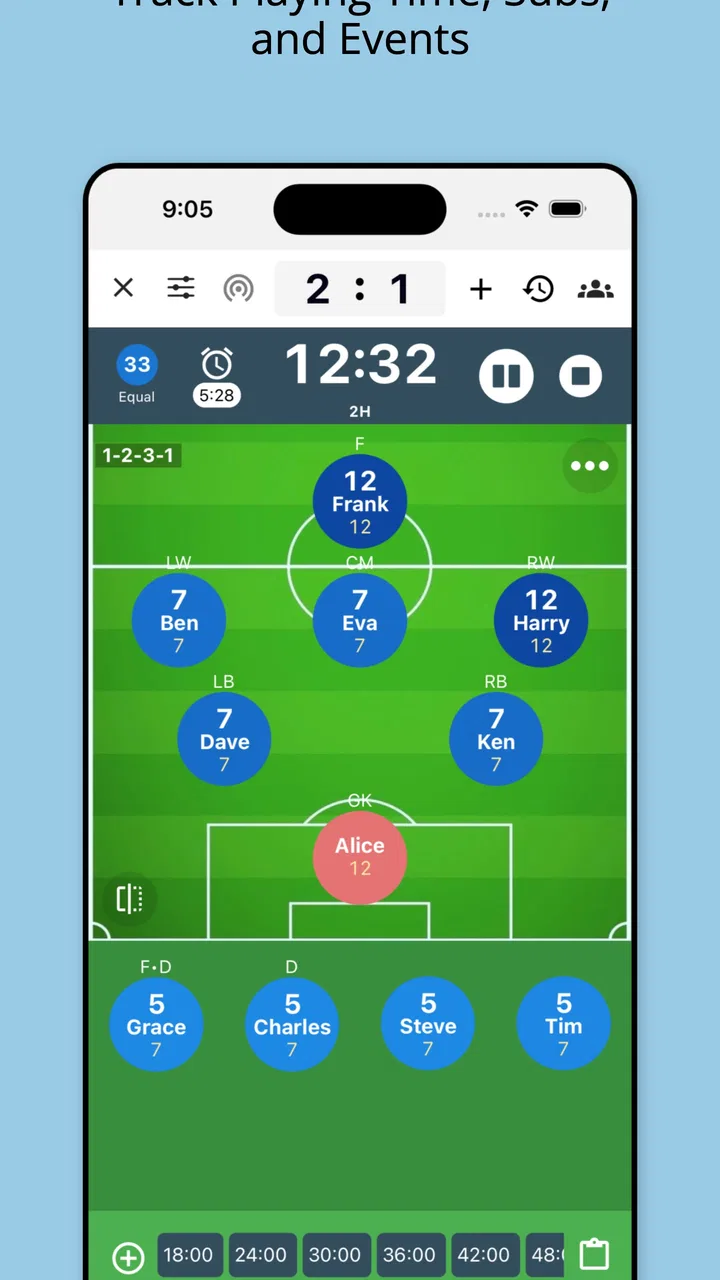
When I first looked at SubTime - Sub Timer & Rotation, I saw a sports tool aimed at a very specific problem: keeping playing time, substitutions, and lineups manageable while a youth match is moving quickly. After using it in that context, I found its value is less about flashy presentation and more about reducing the small decisions that can overwhelm a coach. It gives the person on the sideline a practical place to organize rotations instead of relying entirely on memory, paper notes, or a collection of phone timers.
That focus also makes it interesting for shared use. A parent, assistant coach, or another trusted adult can look at the same planned rotation on the device during a match, while the coach remains responsible for the final call. I would not treat it as a family social app or as a replacement for communication between adults. It is better understood as a focused sports notebook and timing aid that can be passed between people who already know the team and agree on how it should be used.
How SubTime fits into a real shared sideline routine
Imagine a weekend youth game where one adult is coaching, another is helping with equipment, and a parent occasionally needs to bring a player onto the field. The coach has already planned a sequence of substitutions, but the match becomes unpredictable. A player needs a break, the score changes, or the referee pauses play. In that moment, having a rotation plan visible on a phone is more useful than trying to reconstruct the intended order from a conversation held before kickoff.
You May Also Like

 Blood Strike: 2.5 Anniversary
Blood Strike’s Loadouts Turn Every Drop Into a Tactical Gamble
A close look at Blood Strike’s custom loadouts: how fast access to signature weapons reshapes its battle royale rhythm, rewards preparation, and narrows the gap between fights.

 Pandora - Music & Podcasts
Pandora’s Music Is Easy to Start, but Harder to Recover
Pandora’s strength is its low-effort path from a seed to a station. Its weak spot is how much confidence it asks you to place in connection, setup, and quiet recovery.

 8 Ball Pool
 Is Built on Rivalries, Rematches, and Routine
A close look at the rivalries, rematches, shared routines, and unanswered safety questions that turn a quick pool match into a persistent mobile community.

 Samsung Music
’s Quiet Strength Is Playing What You Already Own
Its reach comes less from spectacle than from dependable access to a personal library. That simplicity is both the app’s strongest retention engine and its ceiling.

 AccuWeather: Weather Radar
AccuWeather Review: A Quick, Clear Forecast for Everyday Decisions
For everyday plans, the best forecast is the one you can understand quickly. AccuWeather makes rain timing, radar, and local conditions easy to act on, with a few trade-offs.

 Hill Climb Racing
Why Hill Climb Racing Still Turns Crashes Into One More Run
A tiny car, a bumpy hill and one more upgrade: Hill Climb Racing keeps resurfacing because its simple chaos makes every near-miss feel personal.
More From Our News Desk



I like this kind of workflow because it separates preparation from improvisation. The app can help me begin with a plan, then adjust that plan as the game develops. It does not remove judgment from the coach; it gives that judgment a clearer reference point. That distinction matters in youth sports, where equal participation, player energy, position needs, and the flow of the match may all compete for attention.
For a household sharing one device, the most sensible approach is simple: one adult prepares the team information and rotation before the game, then hands the phone to an assistant only when needed. This avoids several people editing or interpreting the plan at once. I would also keep the device with the coaching group rather than leaving it unattended on a bench, especially when it contains player names or lineup details.
The app is free to install, which lowers the barrier for a volunteer coach who wants to test a dedicated tool before committing to it. Optional in-app purchases range from a small amount to a considerably larger per-item amount, so I would check the purchase screen carefully before confirming anything. The free starting point is useful, but anyone managing a team should understand which parts of the experience are available without payment and which may require an upgrade.
What preparation feels like before the whistle
The strongest use of SubTime is before the match, not during the frantic opening minutes. I would enter or review the squad, think through the intended lineup, and decide how I want to handle the first rotation while I still have time to concentrate. That preparation turns the app into a memory aid. Instead of asking myself who has already played, I can consult the plan and make a deliberate change.
A useful habit is to prepare a basic rotation and then a flexible alternative. The first plan can reflect the normal order of participation. The second can account for a late arrival, a player who is tired, or a position that suddenly needs coverage. This is a practical way to use the app without pretending that a youth match will follow a perfect script.
Another non-obvious benefit is that planning exposes gaps before the game starts. If I cannot make a sensible rotation without repeatedly placing the same player in a demanding role, that is not a timer problem; it is a lineup problem. Seeing the sequence laid out encourages me to solve that issue early, perhaps by discussing roles with an assistant or adjusting expectations with parents.
Keeping boundaries clear on a shared device
SubTime is most comfortable when one person acts as the plan owner. On a shared household phone, I would avoid letting every family member create a separate version of the team setup unless there is a clear reason to do so. Multiple unofficial plans can create confusion, particularly when a parent assumes a lineup is final simply because it appears on the screen.
This is also where account boundaries matter. The app should not be treated as a place to store more personal information than the coaching task requires. I would use the minimum practical player details, keep the phone protected in the same way as any device used by the family, and avoid passing it around casually. These are ordinary precautions, but they become more important when a sports roster is visible to several people.
I would also establish who is allowed to change the rotation. A child can certainly be shown the plan, and an older player may help with timing, but that does not mean every player should edit it. A clear rule such as “the coach or designated assistant changes the plan” prevents well-intentioned adjustments from becoming an argument on the sideline.
For households with more than one child on the same team, the app can help separate the team’s shared schedule from each child’s personal expectations. I would explain that the displayed plan is a coaching tool, not a promise that every substitution will happen at an exact moment. This is especially important when the match requires an unplanned change.
Coordination, trust, and the limits of a rotation plan
I find that a rotation plan works best when everyone understands it as a guide, not a guarantee. Before a match, I would agree with the assistant on who monitors the next change and how the coach will communicate any adjustment; that simple handoff keeps the phone from becoming a second, competing authority. It also sets up a useful question: when is a planned rotation worth following, and when should the game take priority?
Useful handoffs between coach and assistant
The app becomes more valuable when the coach and assistant use the same language. Before the game, I would agree on what the current rotation means, who watches the timer, and who tells players to prepare. During play, the assistant can monitor the plan while the coach watches the field. That division of attention is one of the most realistic reasons to use a dedicated sports app instead of a basic timer.
Still, I would not expect the phone to coordinate adults automatically. It does not replace a quick verbal confirmation. If the coach changes the lineup because of an injury or a tactical decision, the assistant needs to hear that change. The app can show the intended sequence, but people remain responsible for communicating exceptions.
A good routine is to review the screen at natural pauses rather than constantly staring at it. Check the next intended group before a substitution opportunity, confirm who is ready, and then return attention to the match. This keeps the phone in a supporting role. Watching a timer too closely can become its own distraction, particularly for a new coach who is still learning to read the game.
One practical trade-off is precision versus flexibility. A carefully timed rotation can support fair participation, but rigidly following it may be unhelpful if a player is struggling, the game has unusual stoppages, or the team needs a different arrangement. I would use the plan as a guide and record the adjustment mentally or on the app when practical, rather than allowing the schedule to dictate every decision.
Why it is more useful than a normal phone timer
A standard timer can tell me that a period has passed, but it cannot by itself answer the questions a youth coach actually faces: who should come in next, who has already had a turn, and how does the intended lineup fit together? A paper sheet can answer some of those questions, but it is awkward in rain, poor light, or a crowded sideline. SubTime sits between those two approaches by combining time awareness with lineup planning.
Compared with a general notes app, its sports-specific purpose is the main advantage. Notes are flexible, but I would have to design my own method for tracking substitutions. That may work for a small informal game, yet it becomes tedious when the roster changes or several rotations must be considered. SubTime gives the task a dedicated home, which reduces the amount of mental formatting I need to do.
Compared with a full team-management platform, the appeal is its narrower focus. Coaches who need registration, messaging, attendance, payments, schedules, and parent communication may prefer a broader service. I would not choose SubTime as the only digital tool for running an entire club. Its strength is the immediate sideline problem, not administration around the match.
The trade-off is that a focused tool may feel unnecessary for a very small group or a coach who already has a reliable paper system. If I rarely substitute, know every player’s participation by memory, or mainly play casual games without fixed rotations, the extra setup may not repay the effort. The app makes the most sense when the team is large enough, the coach is busy enough, or the participation expectations are important enough that memory becomes unreliable.
Age context and responsible use
The app carries an Everyone age rating, which fits its role as a general sports utility rather than an entertainment product aimed at mature users. That does not mean every use decision should be handed to children. In a youth team, adults should decide how player information is entered, who can view the lineup, and how the phone is handled during the match.
I would show younger players the rotation only as much as it helps them prepare. A child may benefit from knowing when to warm up or which position to expect, but displaying the entire plan can sometimes create disappointment if the coach needs to change it. The healthiest approach is to explain that the list is a working plan and that the coach may adapt it for safety, fairness, or the needs of the game.
Older children can take on limited responsibility, such as reminding teammates who is next or helping an assistant watch the timing. That can build confidence, but it should happen within boundaries set by the coach. The app should support teamwork, not turn a player into an unofficial authority over other children’s playing time.
Trust also matters between adults. Parents may reasonably want to understand how rotations are being handled, but the app should not become a scoreboard for comparing children. I would use it to make decisions more consistent and explain the general approach openly, while keeping individual changes grounded in the circumstances of the match.
Version, support, and day-to-day expectations
SubTime is developed by OTDSoft Inc. and currently appears as version 10.8.11, with support for devices running Android 7.0 or later. That makes it relevant for coaches using an older spare phone, although I would still test the exact device before relying on it at a match. A phone that works at home may be harder to read outdoors, have a weak battery, or respond slowly when the coach is wearing gloves or moving quickly.
Because the app is used around live play, preparation should include more than entering a lineup. I would charge the phone, reduce unnecessary distractions, and make sure the person operating it knows the basic workflow. A short practice run before the first official game can reveal whether the screen is easy to read and whether the assistant understands how the plan is organized.
I would also keep a simple fallback. A paper note with the essential rotation or a verbal agreement can save a match if the phone battery runs low or the device becomes unavailable. That is not a criticism unique to this app; it is a sensible rule for any digital tool used in a time-sensitive setting. The app improves organization, but it should not become the single point of failure.
The rating of 4.7 from over seven hundred ratings suggests that many users find the concept effective, while the presence of nearly one hundred written reviews indicates that people have taken the time to comment on their experience. I see that as encouraging, but I would still judge the app against my own coaching style. A high average does not eliminate the need to test whether its workflow suits my team.
Who should use it, and who should skip it
I would recommend SubTime to a youth coach who regularly manages substitutions, wants a clearer rotation plan, and often has to divide attention between the field and the sideline. It is also a good fit for an assistant coach who needs a shared reference point without adopting a large club-management system. A household that volunteers together can use it effectively if one adult owns the plan and the others understand their supporting roles.
I would be more cautious for a coach who expects automatic fairness calculations, detailed player development records, or complete communication with parents. This is not the tool I would choose for those broader jobs. I would also skip it if my team’s games are so informal that substitutions happen casually and no one needs a written sequence.
Another reason to choose something else would be a strong preference for paper. Some coaches work better with a clipboard because it is instantly visible, easy to annotate, and unaffected by battery life. If that method already produces accurate rotations and does not create stress, moving to an app is not automatically an improvement. The right choice is the one that keeps the coach attentive and the players supported.
My household verdict after using the workflow
SubTime works because it addresses a narrow but genuine coaching headache. It helps turn a vague intention to rotate players fairly into a plan that can be consulted during a busy game. I especially value the separation between preparation and live decision-making: I can organize the expected sequence beforehand, then adapt it when reality demands something different.
For shared household use, my recommendation comes with one condition: agree on responsibility before handing over the phone. The coach should remain the final decision-maker, assistants should communicate changes, and players should understand that a rotation plan can change. Those boundaries make the app more useful and prevent a simple coordination aid from becoming a source of confusion.
It is free to start, rated for Everyone, and has attracted more than one hundred thousand installs, so it is easy to see why a volunteer coach might try it. Optional purchases mean I would review the available choices carefully, but the low-risk entry point makes experimentation reasonable. The app is not a complete team-management suite, and it cannot replace judgment, communication, or a backup plan.
My final view is that this is a practical choice for youth coaches who want a dedicated substitution and lineup planner rather than another general-purpose timer. If your sideline routine is already chaotic, it can bring welcome structure. If your team is tiny or your paper method is already flawless, it may feel like extra work. For the right coach, though, its greatest strength is straightforward: it gives shared decisions a clear place to live without pretending to coach the game for you.
FAQs for SubTime - Sub Timer & Rotation
01What is SubTime - Sub Timer & Rotation used for?
SubTime - Sub Timer & Rotation is designed to help coaches, players, and teams manage substitutions during matches. It can organize playing time, track rotations, and provide reminders when a player’s substitution is due. This makes it especially useful for sports that require frequent changes, such as soccer, futsal, basketball, volleyball, and similar team activities.
02How does the substitution timer and rotation system work?
After setting up the match and adding the players, you can define the rotation or substitution interval according to your team’s needs. SubTime then helps monitor the elapsed time and indicates when a change should be made. The exact workflow may vary depending on the selected sport and configuration, so it is worth checking the available settings before starting an official game.
03Can SubTime be used for different sports and team sizes?
The app is primarily intended for managing substitutions and rotations, so it can be adapted to several team sports rather than being limited to one specific game. You can generally customize the player list, timing, and rotation approach to match your situation. However, users should confirm that the available options suit their sport, squad size, match format, and substitution rules.
04Does SubTime - Sub Timer & Rotation work without an internet connection?
A timer and rotation tool will normally be expected to work during a match without requiring a continuous internet connection, which is useful in gyms, fields, and venues with unreliable coverage. Nevertheless, certain features such as downloading the app, updates, advertising, synchronization, or external services may require connectivity. Test the app in your usual venue before relying on it for an important game.
05Is SubTime easy to use during a live match?
SubTime is built around a practical match-day purpose, but ease of use can depend on how carefully the team and rotation settings are prepared beforehand. Entering players and choosing intervals before kickoff should reduce distractions during play. Because coaches may need to operate it quickly, it is advisable to practice with the app first and confirm that alerts, sounds, and screen visibility work as expected.
Pros
- Simple countdowns make subscription rotations easy to track.
- Useful for managing shared subscriptions and alternating payment periods.
- Recurring timer setup reduces the need to recreate schedules manually.
- Clean interface is quick to understand for occasional users.
- Helps avoid forgetting when it is time to switch account access.
Cons
- Limited value if you only manage one or two subscriptions.
- Notifications may be missed if background activity is restricted.
- Requires accurate setup to keep rotation dates and participants aligned.
- Advanced budgeting or subscription analytics features may be absent.
- Different users may need a shared process to confirm each rotation.

SubTime - Sub Timer & Rotation
Gallery